If you make a payment through the mobile app and the invoice shows a Pending status, this usually means the payment is not fully confirmed yet. This can happen for a couple of reasons.
Why this happened?
A payment may appear as Pending when:
You close and exited the payment page before payment completed.
The payment was completed, but the bank or payment gateway has not yet sent confirmation to the system.
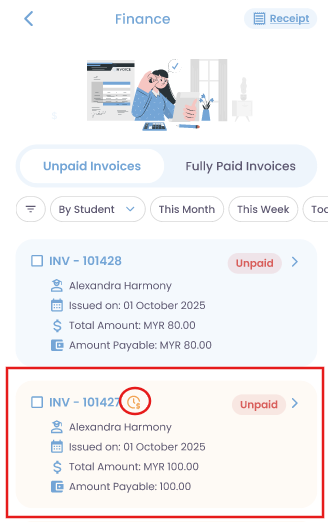
How to Identify a Pending Invoice
In the unpaid invoice section, you will see:
The invoice will be displayed in orange.
A pending payment icon will appear next to the invoice number.
Steps to Resolve a Pending Payment
Tap on the pending invoice to access the invoice detailed page.
Tap the “Sync Payment” button.
The system will check your payment and show one of two results:
Payment Not Completed
A “Pay Now” button will be shown.
You can tap it to complete the payment again.
Payment Awaiting Confirmation
The payment is still being verified by the bank or payment gateway.
You will be asked to wait up to 48 hours for the status to update.
Note: If you have multiple pending invoices, you'll need to open and sync each one individually. Bulk sync isn't supported. If invoices were paid together originally, the system will auto-detect the combined amount.
Was this article helpful?
That’s Great!
Thank you for your feedback
Sorry! We couldn't be helpful
Thank you for your feedback
Feedback sent
We appreciate your effort and will try to fix the article